Network and system administration tools for Windows
Terminal Services Manager
Monitor RDS sessions, track RDP connection quality, and manage remote users across multiple servers
- Session and user monitoring
- Server performance monitoring
- Process monitoring
v26.10 · clean, signed installer · no sign-up

Remote Process Explorer
Remote Process Explorer is an easy-to-use solution for managing processes on a remote computer!
v25.05 · clean, signed installer · no sign-up

Remote Desktop Audit
Find out who has been accessing your servers via remote desktop!
v25.05 · clean, signed installer · no sign-up

Wi-Fi Scanner
With Wi-Fi Scanner, you can find all nearby wireless networks, with detailed information about their parameters and signal strength.
v25.05 · clean, signed installer · no sign-up

Our products
Network monitoring and system-administration tools for Windows.

Terminal Services Manager
Monitor & Manage RDS / RDP Sessions

Remote Process Explorer
Powerful tool for managing, monitoring and analyzing processes on a local or remote computer.

Remote Desktop Audit
Monitoring and analyzing Remote Desktop Services logs.

Wi-Fi Scanner
Simple and convenient tool for monitoring 802.11a/b/g/n/ac/ax wireless networks.

LanSend
Send pop-up messages to Windows PCs across your LAN. A net send and msg.exe alternative with no server and nothing to install on the recipients.
Latest releases
The most recently updated tools, newest first.
-
Remote Desktop managementv26.10Oct 12, 2026
-
LAN messagingv26.08Aug 30, 2026
-
Remote Desktop auditingv25.05May 16, 2025
-
Wi-Fi analyzerv25.05May 16, 2025
-
 MAC address changerv25.05May 16, 2025
 -
Remote process managementv25.05May 16, 2025
Built for Windows network administrators
Lightweight, native tools for network monitoring and system administration. Pay once and own them for good, with perpetual licenses and no subscriptions.
- 9Windows tools
- 5Free for personal use
- 20+ yearsOf releases
- PerpetualLicenses, pay once
Need a hand?
Browse the knowledge base or reach the team for licensing and technical questions.
Visit supportLatest news
Product releases, updates and company announcements.
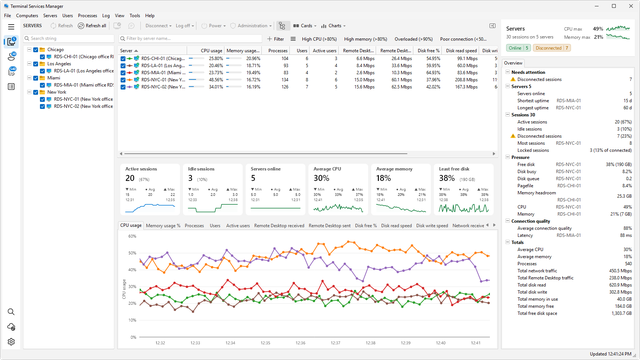
Terminal Services Manager 26.10 - What's New
Version 26.10 reorganizes the main window around a sidebar and adds an inspector panel with Active Directory details, configurable summary cards, and a command …
Read more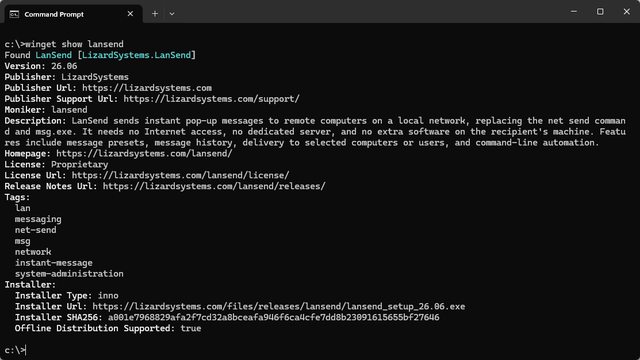
LanSend is now available on winget
LanSend can now be installed and updated with winget, Microsoft's command-line package manager.
Read more
LanSend 26.06: native 64-bit, themes, and a faster core
LanSend 26.06 is a native 64-bit release with light and dark themes, session targeting, a Presets menu, and quicker computer-list building.
Read more